Up to 5 Lines.
Zero Waiting.
Shut Up and Dial dials up to 5 lines at once (you choose 1 to 5) and puts you on the line the second a real person says hello. Voicemails, no-answers and busy signals never reach your ear. Your CRM, follow-up calendar and mailers are built in.
Built for agents
who live on the phone
Expireds, FSBOs, probate, absentee owners, past clients. Load the list, put on your headset, and spend your time talking to people.
Up to 5 lines at once
Choose 1 to 5 lines. Start with one or two and add lines as you get faster. The first live person connects to your headset and the other lines hang up. Answering machines are detected, and your recorded voicemail can drop on its own.
A CRM that keeps up
Lists and folders side by side: New Leads, Nurture, Appt Set, Closed, Dead, plus your own. Drop someone in a folder mid-call. Every note, call and result stays on their lead file.
Follow-ups that happen
Schedule a callback on any date without hanging up. Due follow-ups get dialed first, and the dialer remembers which number was the right one. Call a whole day of follow-ups from your own cell in one click.
Letters on autopilot
Every new lead puts a printable letter on tomorrow's calendar, laid out for a window envelope with their mailing address. Edit the wording once and print a day's worth at a time.
Caller ID that stays clean
Local numbers for every area code you call, rotated the way you choose. If a number starts showing up as spam, swap it for a fresh local number in a click. One click also rings your cell so you see what homeowners see.
AI call notes
Record the conversation and get a summary in the lead's notes before you hit the next call: when they'd move, where to, why, the price they mentioned, and the next step. The full transcript is one click away.
Imports that remember
REDX, Vortex, Landvoice, probate or any spreadsheet. Columns match automatically and your mapping is saved for next time. Duplicates merge into the lead you already have, and Do Not Call stays Do Not Call.
Property in one click
Zillow, Homes.com and Google Maps for the address you're dialing, right on the call screen. Know the house before they finish saying hello.
Your phone, your Drive
New Leads, Nurture, Appt Set and Closed sync to your phone's contacts. Every night, your notes and leads back up as spreadsheets to your own Google Drive.
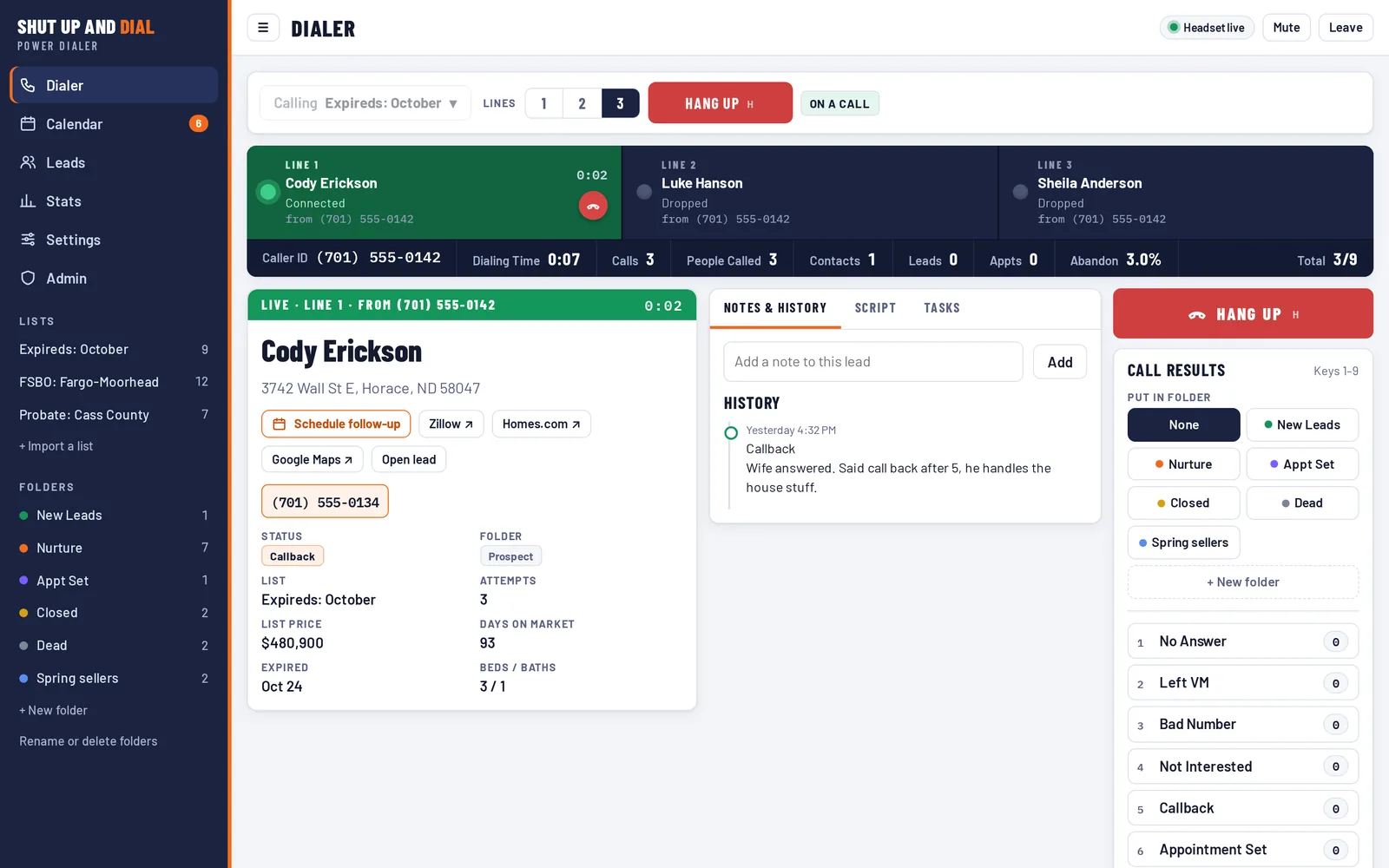
See who answered.
Know what to say.
The moment someone picks up, their lead file is in front of you: name, address, list details, every past note, and your script one tab over.
- Big hang-up button, plus one on every line
- Call results on keys 1–9, so the next batch starts with one keystroke
- Live stats: dial time, people called, contacts, leads, appointments
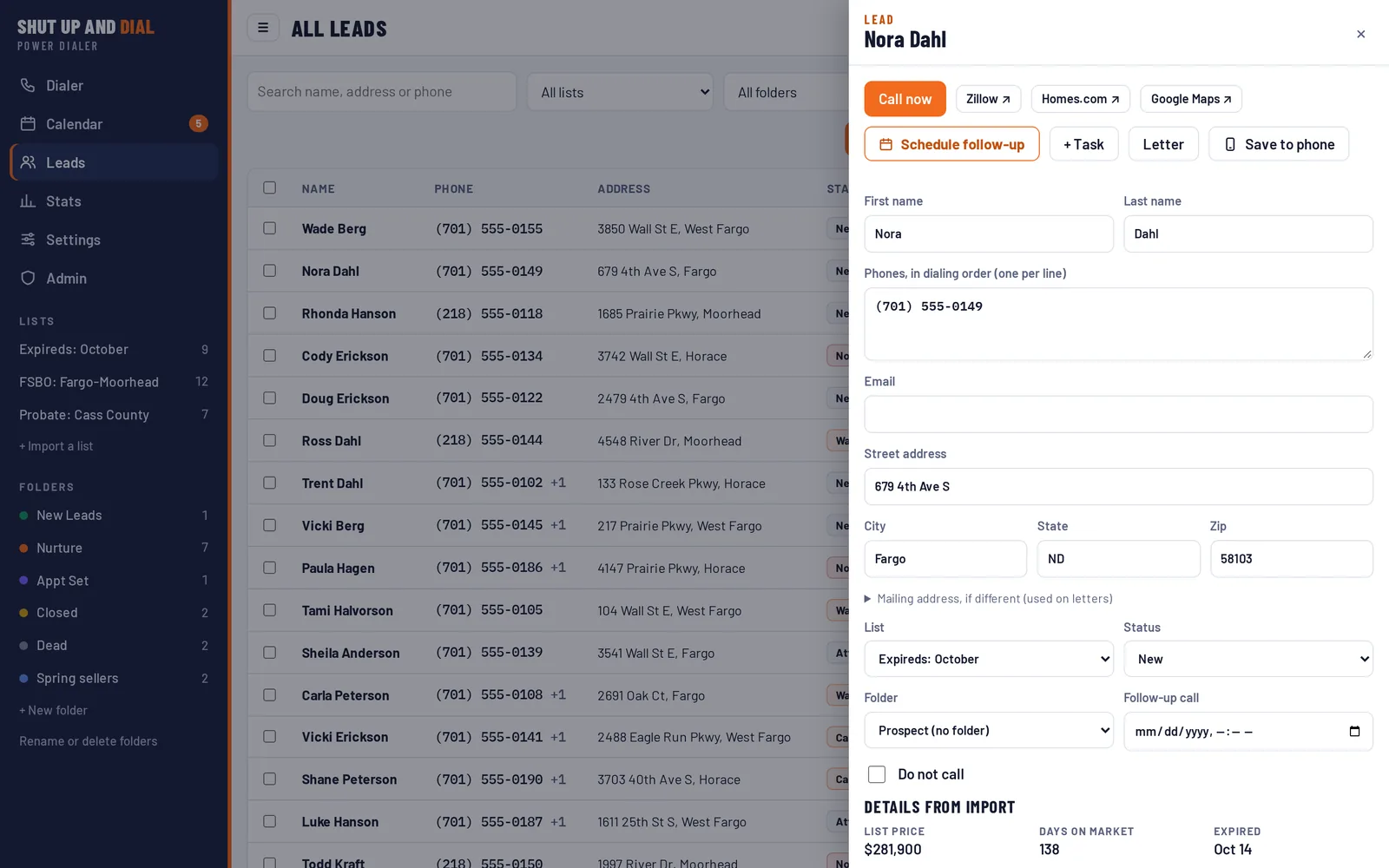
Every lead,
every number, every note.
Search, filter by list or folder, and open any lead to call, schedule a follow-up, add a task, print a letter or save them to your phone.
- Leads with several numbers: dial the first three or all of them
- Wrong numbers get crossed out; the right one is remembered
- Export anything to CSV whenever you want
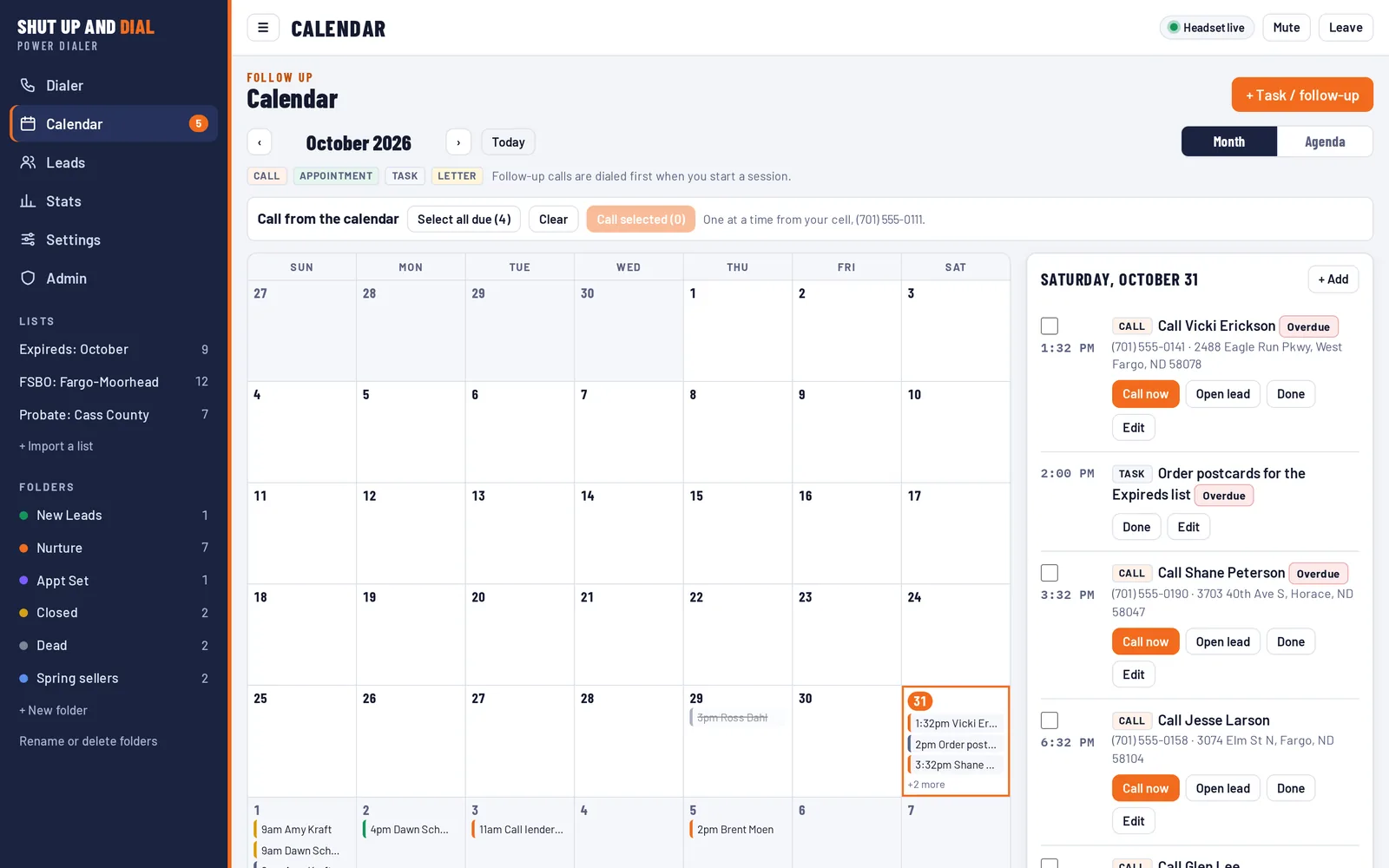
Nothing slips
through the cracks.
Follow-up calls, appointments, tasks and letters on one calendar. The badge tells you what's due today.
- Select all due calls and dial them back to back from your cell
- Month and agenda views
- Print every letter that's due in one go
Sign up today.
Dial tonight.
Pick your plan
Check out with a card. You'll get an email to set your password and your dialer is switched on.
Get your numbers
Choose local numbers in the area codes you call, add your cell for callbacks and calendar calls, and connect your headset.
Import and dial
Upload your list's CSV, check the box that it's been scrubbed against the Do Not Call Registry, pick your lines and press Start.
You'll need: a computer with Chrome or Edge, a USB headset, and leads from your list provider (REDX, Vortex, Landvoice, a probate source or your own database). Lead data isn't included.
Shut Up and Dial was built by Joseph Haj, a REALTOR® with REAL Brokerage in Fargo–Moorhead who closes 30+ homes a year. It's set up around how listings actually get won on the phone: expireds, FSBOs, probate, and following up until the timing is right.
One plan. Everything in it.
Dialer, CRM, numbers and calling, for one agent.
- Power dialer: up to 5 lines at once (choose 1–5)
- Built-in CRM, folders and calendar
- Calling included
- 3 local phone numbers
- Call recording and AI call notes
- Auto letters, Google Drive backups, phone contacts
- Everything in Monthly
- Almost two months free compared with monthly
- Your price is locked for the year
Calling is included for one agent's normal prospecting, up to 5,000 dials a month (about 4 hours of multi-line dialing a day). Questions? Call 218-688-0802.
Straight answers
Is calling really included?
Yes. Your plan covers the calls, the minutes and three local phone numbers, up to 5,000 dials a month, which is more than most full-time agents make. Call us if you need more numbers or a team setup.
Do I need my own leads?
Yes. Shut Up and Dial is the dialer and CRM; the leads come from your list provider (REDX, Vortex, Landvoice, a probate source) or your own database. Exports from most providers import with the columns matched for you, and you can save the mapping so tomorrow's file takes one click.
Can I bring my leads and notes from another dialer?
Export your contacts to a CSV and import it. Names, numbers, addresses, mailing addresses and any extra columns come over. Anyone already in your CRM is merged instead of duplicated.
What number shows up when I call?
Local numbers you choose, rotated automatically (match the homeowner's area code, every call, every N calls, or one number). Callbacks to those numbers ring your cell. Follow-up calls from the calendar can go out from your own cell.
Will my numbers get labeled "Spam Likely"?
Any number that makes a lot of calls can be. The dialer spreads calls across your numbers so no single one gets worn out, and you can ring your own cell anytime to see exactly how a number shows up. If one gets labeled spam, it's easy to swap it out: pick a new local number and you're back to dialing in a click.
How many lines can I run?
Up to 5 lines at once. You choose 1 to 5 right on the dialer and can change it anytime. More lines means more conversations an hour, but also more times two people pick up together and one has to be dropped. The dialer watches that for you: if dropped calls go over 3% in 30 days, it drops to one line on its own until the rate comes back down.
What about Do Not Call and calling rules?
You're responsible for calling legally, and the dialer helps: every import asks you to confirm the list was scrubbed against the National Do Not Call Registry, Do Not Call leads are never dialed or re-imported, calls only go out during the hours you set in each homeowner's own time zone (never before 8am or after 9pm), and the dialer drops to one line if too many answered calls go unconnected. Recording is off for all-party-consent states unless you turn it on and announce it. This isn't legal advice; check your state's rules.
Does it work on my phone?
Dial from a computer with Chrome or Edge and a USB headset. Your leads, calendar and notes open fine on your phone's browser, and your hot folders sync to your phone's contacts.
Can I cancel?
Monthly plans cancel anytime and run through the end of the month you paid for. Annual plans are paid once for twelve months. If you leave, your leads and notes stay put, so turning the dialer back on later picks up where you left off, and your nightly backups are already in your own Google Drive.
Shut Up.
And Dial.
Your next listing is on a list you already have. Go call them.